 “Behind the Score” For the 3rd installment of my series on template design, let’s look at some more “behind the scenes” functions that can give your template new functions and possibilities. If you haven’t read the previous two posts on this topic, I highly recommend you start by reading those first, as they cover more general topics and philosophies behind the design and ultimate implementation of your template. Blog #1 – Template Design Blog #2 – Use the Right Tool for the Job I often encounter files where whoever created and uses the template spent a great deal of time making sure that everything looks great on the main score. All the elements are perfectly placed, font choices are consistent and clear and a whole host of other features are in evidence. So, the job is done, correct? Well…. Not quite. Having an amazing looking score is great foundation, but if the further functionality of the file in terms of how the parts are formatted is ignored or overlooked, then the job is only half finished. As we discussed before, when you place an expression on the score in Finale or Sibelius, you need to use the right tool for the job. You can have an element on a score like a tempo marking that looks perfect on the score, but if that marking was placed using the wrong tool or category, then it ultimately will not function properly for the parts. Just think, on a large orchestral score, there could be 30 individual parts that will need to be accounted for and if an element that is supposed to show on all 30 of those parts does not, that is going to cause you a lot of headaches and unnecessary work. Even on a smaller score, having to reinput different elements for only a few parts is tedious in the extreme. The next consideration is how many parts there will be. Sounds easy, right? It’s the same number of parts are there are staves in the score. Or is it? Look at the screenshot from a large orchestral score. 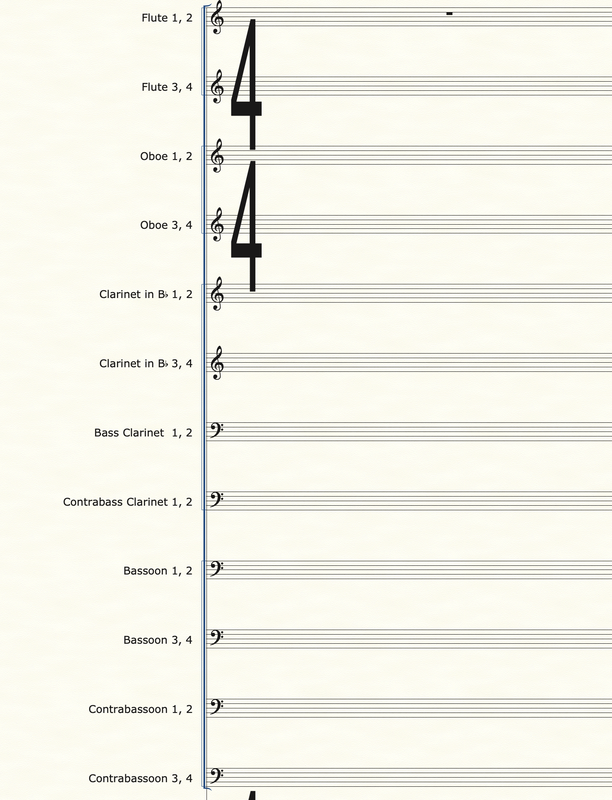 This woodwind section is (admittedly) very large. There are 12 staves just for winds. But how many parts are there? Actually, there are 24 parts to format. The reason for that is players do not want to have to read multiple lines of notation to find their part. It is common and accepted practice for scores to combine multiple instruments onto a single line, but parts (if possible or unless otherwise specified) should not have multiple voices on them. So, how can we design a system where a single staff can be made into multiple parts AND do so without changing the original staff? While this may sound tricky or impossible, there are a few good methods to achieve in either Sibelius or Finale. And there is one method you should ABSOLUTELY NOT use, and I’ll explain that too. My preferred method is to use additional hidden staves. Check out this screen or the same score, but this time with the hidden staves revealed. 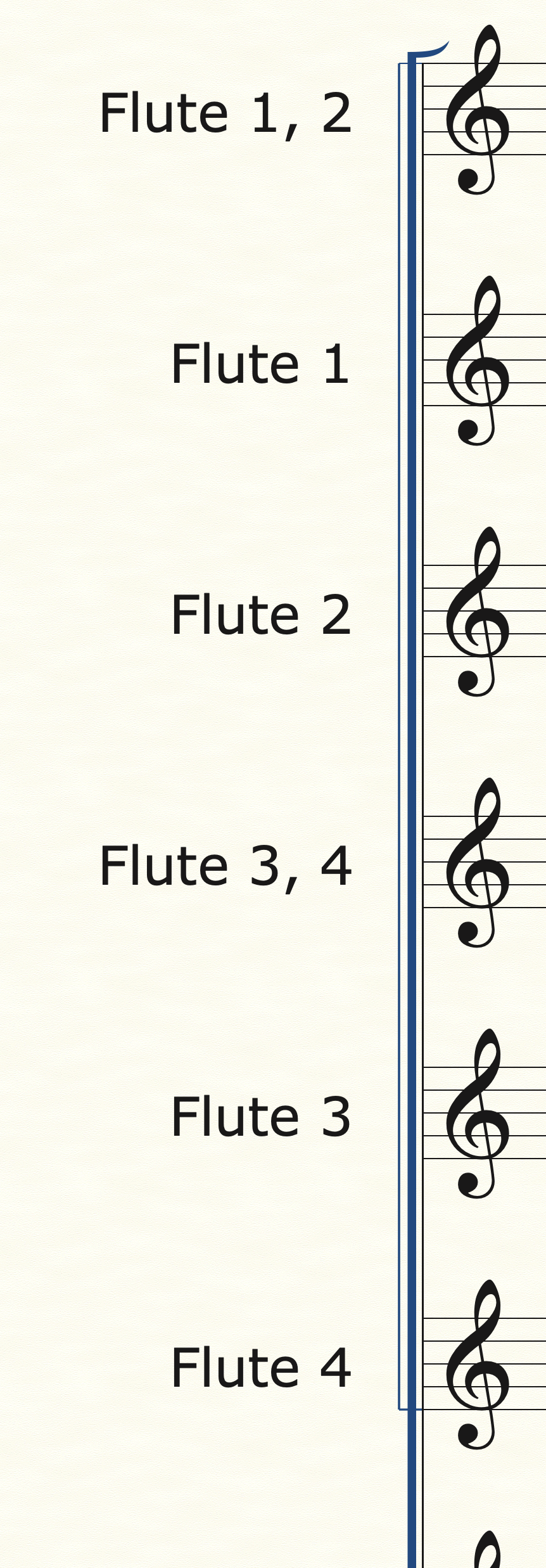 As you can see, right below the Flute 1, 2 staff are two separate Flute 1 and Flute 2 staves. These staves are hidden in the main score and only used for parts. You can hide staves in Finale by using the Staff tool, double clicking the staff you want to hide and selecting “Force Hide staff” and select “In Score view”. Now, you can add additional staves to your template without changing the formatting or orchestration of your score. In Sibelius, you can achieve a similar function by us the “Focus on Staves” feature in the layout tab. That dropdown menu will show you all the different staves in a file and you can choose which ones to have visible on the score.
Once these additional staves are in place, you can copy the original part into both of those and separate out the notes for each part. There are multiple methods for this and which one to use greatly depends on several factors, including the complexity of the music, how you want to handle cues in the different voices, etc. For Sibelius, you can highlight the source staff, go to Note Input/Explode, and then select the staves you want the music to go into. Bam! Done! In Finale, you can use Utilities/Explode, but I prefer to use JW Staff Polyphony to help split the voices or to copy the source music into the new staves, and then use TG Tools/Process Extracted Parts and select the appropriate voice for the staff I’m working on. The benefits from using this hidden staves method will pay dividends repeatedly down the road for you. Now, you have the original source music intact and can refer to it while making any number of changes to the individual parts. Later, once you have formatted your part for the top line notes, in this case Flute 1, often you can use the copy part layout function in both programs as the 2nd voice, Flute 2, will need the same formatting as the 1st voice. That means you only must format one part and then you can reuse that formatting again without having to go through all steps twice, a huge time-saver. One method that you SHOULD NOT USE is to extract the original part into a separate file and then format. This method was the only one available before Sibelius (with dynamic parts) and Finale (with Linked Parts) added this functionality well over ten years ago. Using this method will create dozens of extra steps and redundancies that waste time and are terribly inefficient. There are a few very special circumstances where it may be necessary to extract a part as an entirely separate file, but those are very few and rare. If you are using a part extraction method, I urge you in the strongest terms to not use this method any longer. You are wasting your time, creating additional opportunities for errors to creep into your music and missing out on tons of benefits from having your parts linked to the original score. Just like building a house, a good template is built on a strong foundation and a lot of the most important features are where you can’t see them. The more time and consideration you give to every step in the process from initial note input to final editing will yield benefits that multiply over the time you are working on the specific piece of music and over the months and years you use your template. As always, if you have questions, need advice, want to schedule a time for a custom template consultation or need a template designed for you next project, please contact us here are Engraver’s Mark Music. We have the tools and experience to help with any project, big or small. A common question I get asked from composers to music students exploring the various options for music notation software is, “Which one is the best?” Well…. I would guess all of us have certain opinions in the music engraving world, but I think the better question may be, “Which one is best for me?” To explore this a bit more, let’s take a look at the current state of music notation software and how we got there. The art of music engraving has undergone vast changes in the last 30 years. Like most of society, the digital revolution and the age of the personal computer completely upended how we work and what functions and capacities are available to the average person. What once took a team of people all day to do might only take one person a few minutes now. Music engraving got into the digital age with programs like Finale and Sibelius, both of which started to appear in the late 1980s. Since then, there have been several other digital music notation options like Musescore, Lilypond and most recently (and successfully) Dorico, along with various apps for the iPad (like NoteFlight and StaffPad and others) have come on the scene. Finale and Sibelius have, and mostly still do, dominate the music engraving and educational markets while other options have largely remained as niche options of individual composers. However, these other options are now making great strides in their capabilities and ease of use, making them viable options not only for independent composers and arrangers, but even for major scoring sessions. When I get asked the question of “Which notation software should I use?”, my first response is always a question of my own, “Well, what will you be using it for?”. This question is, to me, the REAL question to ask yourself if you are looking into the various notation software options. Knowing where you dream of your music going or what part of the music industry you want to get into may affect your choice. For example, if you are an independent composer/arranger or even a music teacher, writing simple pieces for a few instruments or musical exercises for your students, then just about any option will work fine. I would suggest using any of the iPad apps as the learning curve for those is likely to be manageable and you won’t have too many options or menus to get lost in. Also, Finale, Sibelius and Dorico all have a free version of their notation software which may have all the various options and functions you could need. There’s no real need for a major investment in time and money if your notation needs are very “local”, meaning the music will be produced and distributed largely by you and just for you or a few others or simplistic, meaning you are not writing avant-garde new age music for specialized instruments. Where things get a bit more complicated is when your aim is for a larger market OR a larger project. The free versions of these different softwares will be limited in the number of staves or other functions they have and if you have a larger work, they simply won’t be able to handle that. Also, if you plan on working with a publishing company or even just other arrangers or composers on a given project, it’s best to choose a software that will grow with you and be able to be used by others seamlessly as well. This is where the full versions of Finale, Sibelius and Dorico, I feel, are the most appropriate. There’s no point using a software that won’t have the capabilities you’ll need down the road. So now you may ask, “Ok, I need a full featured music notation software. Which one should I choose?” For years, the “big 2” options were Finale and Sibelius. In professional and educational circles, one or the other has been used for decades. Using either one of these options will give you all the functionality and capacities you could ever need (and many that you’ll probably never use). I would also add Dorico to this list. Being, relatively, the newest kid on the block in the music notation world, Dorico has had some growing pains and, quite frankly, it really wasn’t ready for the big time when it first came out over five years ago. Now, I truly believe Dorico is not only a viable option, but one that offers some of the most forwarding thinking functionality and ease of use features. I still don’t see Dorico being used in my end of the music engraving world as much as Finale or Sibelius, but it is certainly gaining ground on both. Professionally, I have used Finale and Sibelius for over 16 years and am looking to add Dorico into the available options here are Engraver’s Mark Music in the coming months. My final piece of advice is, choose an option that fits your needs now but can grow with you in the future. If I was starting from scratch today, I would try to learn with each of the free versions of Finale, Sibelius or Dorico and then see which one felt most natural and go with that. If you’re an independent composer or arranger, there are so many options out there now, and even better, there are so many good options that weren’t available before. Personally, I used Finale before I learned Sibelius and I still tend to gravitate that way at times. However, there are long stretches of projects where I am primarily using Sibelius, by my choice or because the client works in that program, and I come to find I enjoy using it as much if not more than Finale. Again, all these different music notation programs have their advantages and disadvantages; things that drive us nuts and features that are lifesavers. The best option for you is the one that makes creating your music as seamlessly as possible. If you have any questions or thoughts on this, please contact Engraver’s Mark Music and let’s see how we can guide you and help get your music out to the world! So, there are a ton of extremely powerful tools for creating scripts and other functions for Finale, Sibelius, Dorico and others. These are, generally speaking, geared to and created for the power users, who use these programs for a living. Great examples of these are Keyboard Maestro (great for creating macros of any kind), NYC Music Services Notation Express, and the forthcoming JetStream controller for Finale. I would highly, highly recommend all of them and have used, or will use, them all.
|
AuthorSammy Sanfilippo, CEO of Engraver's Mark Music Archives
November 2023
Categories
All
|

 RSS Feed