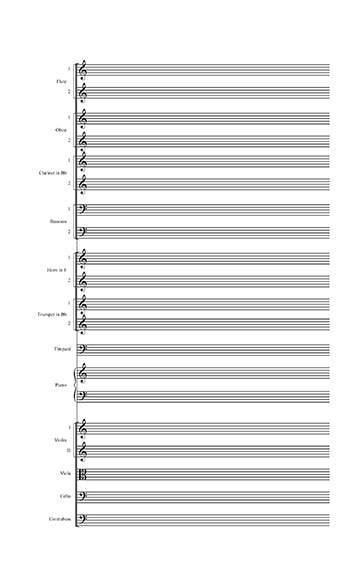
 In the first of a two-part series, I wanted to go over some basic ideas, concepts, and issues you want to think about as you create a custom template for your music notation. There are so many topics to consider here that I could not cover them all, however, I do want to go over some the guiding principles as you begin to develop a music notation template.
Whenever you are designing anything, it is best to start with a vision of the end product; how it will be used, what it will look like and how it will function. Smart design means carefully thinking through all your steps with the end in mind. Yes, you will adjust and change your design as you go, but without that clear goal in the beginning, your final product will not fulfill all the purposes you originally intended. In the music engraving world, design, implementing and updating templates is a larger part of any engraver’s day to day work. Every time a new feature is added to a notation software, or a new workflow is developed, it can create new possibilities or challenges that need to be addressed in the templates that we use every day for our clients. By constantly updating the templates we designed, our clients benefit from our increased abilities, capacities, and efficiencies. So, how do you start to design a template in any music notation software? Well, I always start with considering the needs of the end user/customer. Knowing who will be reading and using the music informs all the choices that will be made afterwards as you design the template. Key questions are:
The answers to all these questions will completely change the trajectory of the design of your template since each of these scenarios will necessitate your template having difference features and formats. The next step to is come up with a top-down approach, starting with features like page sizes and staff sizes for the score and parts, instrumentation, font choices and a whole host of other issues. A great place to start for all orchestral music is to study the MOLA Music Preparation Guidelines. This gives a ton of information on industry standard practices and requirements and really does a great job in explaining and giving examples. Choral music has many different requirements, and it is usually best to check with your publisher on what features they will want to see from your music. Once you have all this information, it’s time to start making your score as readable as possible. Before any music is added to your score is the time to make sure the score and part pages have consistent and standardized placements and spaces. Where will the title information and other information be placed? How about the spacing between each staff on the score pages or the distance between the systems for each part? As simple as this sounds, spending time and thought on these basic elements will improve not only the look of your music, but the overall presentation and quality as well. Always aim for consistency and clarity. As always, if you have questions or need some help designing a template for your music, Engraver’s Mark Music is here to help. We have templates ready to go for just about any musical situation or we can create a custom template or modify your existing template. Just contact us and we’ll be happy to help. In the next post in this series, I’ll go over some more specific details and best practices of not only how to set up a good template, but how to use it and what modifications you may want to consider. One of the standard tasks I get asked to do as a music engraver/copyist is to take someone’s finished score and format the parts either for a recording session or live performances. Simple enough, right? Well… sometimes yes and sometimes no. Often, I have found that while the composer or orchestrator has spent a great deal of time thinking about and formatting how their scores will look, they have not really considered the needs of the parts and the formatting thereof. So, this brings up an interesting dilemma for those of us in the music engraving world: Should I, no matter what condition the file is in, good or bad, perfect, or lacking, automatically copy everything into one of my own templates and then proceed OR should I make it work with the file I’ve been given? This is a rather complex question and can have many potential answers depending on the situation. I’ll do a deeper dive on this question in another blog post. For this exercise, I’ll say our client used Finale version 26. Let’s also assume the file you have is in good shape, i.e., all elements of the music seem to be input correctly and all things are in the right categories and places, etc. The next step is to assess the end goal of the parts. Do you know the page size that is required for the given scenario and other considerations? Once all this information is gathered and established, you can now proceed on to formatting parts, right? Oh, not so fast. In Finale or Sibelius, the standard look and feel of the parts is already in the document menu and if it doesn’t match what you need, you’ll have to change it. In Sibelius, just go to Parts/Part Appearance/Configure All Parts. From here you can set page size, staff size and a host of other features that all affect all the parts in one go. Super helpful. For Finale, go to Document/Page Format/Parts. This window gives you the ability to preset all the default options you’ll need for all the parts. Now, let’s assume the default page format in the file you are using is letter size and you want to use either A4 or 9x12. Do you have to go through every linked part and change the page size? No! If you have changed the default page size, then just go to Page Layout tool/Redefine Pages/Selected Pages of Selected Parts/Score. Then select all your parts and click ok. Bam! Everything is now in the correct page size. There are lots of other features in the Parts Format menu in Finale for you to establish the default page margins and staff size as well. Again, depending on your situation, your page margins and staff sizes need to be set to very specific values. Knowing what all those are for any given music project is one of the jobs of a good music copyist. If you are only doing this on one chart, it’s easy to just type in all the values, click ok and move on with life. However, what if this is a major project, with multiple files to adjust. Do you want to be typing all that information in every time? That would be annoying and time consuming. Instead, use a script that will do it all for you. And before you get freaked out that you don’t know how to use FinaleScript or another macro program, never fear! I have provided a zip folder that contains FinaleScripts that will do it all for you. The macros will set up default part format to either A4 or 9x12, a staff size to 7.8mm and page margins at around ½ inch. In the folder you’ll find versions for both Windows and Mac. To copy the scripts into your FinaleScript folder, please reference this webpage for Mac and this webpage for Windows. Click on the “To Share a Script with other Finale users” and this will show you the steps to find the folder on your computer (also go to your preferences window, then folders) where the FinaleScripts are stored. Open that, and then copy appropriate script there. Restart Finale and all should be set to go. * A note on the number values used in these scripts. I typically use EVPUs as my measurement unit of choice. Yes, I know it’s a strange numerical value and can be slightly subjective depending on you monitor set up, however, its’ easier for me to remember whole numbers than a lot of decimal points. Typically, if I am setting up a template to have very specific measures, whether in inches or millimeters, etc., I will change my measurement unit to that, set all my defaults I want in the correct values, and then switch back to EVPUs. The measurements will still be the same, but the numerical value will look different and be a bit easier for me to remember. If you are using another measurement unit, that’s totally fine, however, you’ll need to go into the scripts and adjust the numerical values accordingly. Or, switch your measurement unit to EVPUs before running these scripts and then switch them back to your preferred one after. Contact me for help on this. I offer Finale instruction for $60 per hour if you want to dive deeper on this kind of feature. I have tested these scripts on all my systems and other members of my team have used them as well. They were written in Finale v26, but can be used in other versions, like Finale v25, though you may have to adjust the script. As with anything freeware, use at your own discretion and I cannot guarantee results. * (for more information on this, check out this blog post from Scoring Notes and this post here at Engraver’s Mark Music) Now you have an easy, repeatable way to adjust default part page parameters in any Finale document! As always, if you need advice or assistance with any music engraving, copying or printing project, contact me and let’s start a conversation! 
A common question I get asked from composers to music students exploring the various options for music notation software is, “Which one is the best?” Well…. I would guess all of us have certain opinions in the music engraving world, but I think the better question may be, “Which one is best for me?” To explore this a bit more, let’s take a look at the current state of music notation software and how we got there. The art of music engraving has undergone vast changes in the last 30 years. Like most of society, the digital revolution and the age of the personal computer completely upended how we work and what functions and capacities are available to the average person. What once took a team of people all day to do might only take one person a few minutes now. Music engraving got into the digital age with programs like Finale and Sibelius, both of which started to appear in the late 1980s. Since then, there have been several other digital music notation options like Musescore, Lilypond and most recently (and successfully) Dorico, along with various apps for the iPad (like NoteFlight and StaffPad and others) have come on the scene. Finale and Sibelius have, and mostly still do, dominate the music engraving and educational markets while other options have largely remained as niche options of individual composers. However, these other options are now making great strides in their capabilities and ease of use, making them viable options not only for independent composers and arrangers, but even for major scoring sessions. When I get asked the question of “Which notation software should I use?”, my first response is always a question of my own, “Well, what will you be using it for?”. This question is, to me, the REAL question to ask yourself if you are looking into the various notation software options. Knowing where you dream of your music going or what part of the music industry you want to get into may affect your choice. For example, if you are an independent composer/arranger or even a music teacher, writing simple pieces for a few instruments or musical exercises for your students, then just about any option will work fine. I would suggest using any of the iPad apps as the learning curve for those is likely to be manageable and you won’t have too many options or menus to get lost in. Also, Finale, Sibelius and Dorico all have a free version of their notation software which may have all the various options and functions you could need. There’s no real need for a major investment in time and money if your notation needs are very “local”, meaning the music will be produced and distributed largely by you and just for you or a few others or simplistic, meaning you are not writing avant-garde new age music for specialized instruments. Where things get a bit more complicated is when your aim is for a larger market OR a larger project. The free versions of these different softwares will be limited in the number of staves or other functions they have and if you have a larger work, they simply won’t be able to handle that. Also, if you plan on working with a publishing company or even just other arrangers or composers on a given project, it’s best to choose a software that will grow with you and be able to be used by others seamlessly as well. This is where the full versions of Finale, Sibelius and Dorico, I feel, are the most appropriate. There’s no point using a software that won’t have the capabilities you’ll need down the road. So now you may ask, “Ok, I need a full featured music notation software. Which one should I choose?” For years, the “big 2” options were Finale and Sibelius. In professional and educational circles, one or the other has been used for decades. Using either one of these options will give you all the functionality and capacities you could ever need (and many that you’ll probably never use). I would also add Dorico to this list. Being, relatively, the newest kid on the block in the music notation world, Dorico has had some growing pains and, quite frankly, it really wasn’t ready for the big time when it first came out over five years ago. Now, I truly believe Dorico is not only a viable option, but one that offers some of the most forwarding thinking functionality and ease of use features. I still don’t see Dorico being used in my end of the music engraving world as much as Finale or Sibelius, but it is certainly gaining ground on both. Professionally, I have used Finale and Sibelius for over 16 years and am looking to add Dorico into the available options here are Engraver’s Mark Music in the coming months. My final piece of advice is, choose an option that fits your needs now but can grow with you in the future. If I was starting from scratch today, I would try to learn with each of the free versions of Finale, Sibelius or Dorico and then see which one felt most natural and go with that. If you’re an independent composer or arranger, there are so many options out there now, and even better, there are so many good options that weren’t available before. Personally, I used Finale before I learned Sibelius and I still tend to gravitate that way at times. However, there are long stretches of projects where I am primarily using Sibelius, by my choice or because the client works in that program, and I come to find I enjoy using it as much if not more than Finale. Again, all these different music notation programs have their advantages and disadvantages; things that drive us nuts and features that are lifesavers. The best option for you is the one that makes creating your music as seamlessly as possible. If you have any questions or thoughts on this, please contact Engraver’s Mark Music and let’s see how we can guide you and help get your music out to the world!  As you’ve read in previous blogs here at Engraver’s Mark Music, I’m a big fan of programs and useful tools that make our jobs as music engravers easier and more fulfilling. Yes, strange as that may sound, finding new tools and developing new skills to complete the basic tasks we all have as engravers is a very satisfying part of the job. One of the tools I’ve mentioned before is Keyboard Maestro (exclusively for Mac, sorry PC folks). This is an unbelievably powerful program that can help automate so many tasks and functions in all sorts of programs. For those of us in the music notation world, it can be a useful alternative to either FinaleScript (for Finale) or anything to reassign hot keys in Mac OS for the specific program you are using (check out my blog post here about this very topic). As with all new software or these kinds of “power-user” tools, the learning curve can be a bit steep and off-putting for new users or those who just don’t want to invest that much effort to “re-invent the wheel.” You can stay only in the specific workflows built into your favorite notation program and be fine. However, there are so many additional options and functions you can unlock with Keyboard Maestro (or other tools mentioned in this blog like JetStream for Finale, or our Tech, Tools and Tips posts). To make Keyboard Maestro more approachable and applicable, the amazing FinaleSuperuser channel on YouTube has made a free course on how to integrate Keyboard Maestro and Finale. Check it out here. This course is AMAZING! It covers topics and techniques from basic concepts all the way to advanced features and will give you all the information, step by step, on how Keyboard Maestro can be used with Finale. Best of all, once you’ve gone through the course, I’m sure, like me, you’ll have new ideas of your own on how to use all the new skills you’ve learned to build your own workflows for Finale. While this course is specific to Finale, I have used some of the concepts to make Keyboard Maestro scripts for various functions in Sibelius as well. It’s a little more difficult using some of these tools in Sibelius as it uses a totally different structure than Finale for the various functions in the program, but it can be done with some trial and error. Ok, lots of errors, but then eventual sweet, sweet success. So, instead of binge watching the latest kitchen make over show or pet competition reality TV (you know who you are), give this series of videos a good look. I made it a point to only go through one chapter of videos at a time until I mastered the concepts therein before moving on and that made the whole process much easier and more enjoyable. As schools as starting back all over the country, why not make this your back-to-school assignment! As always, please contact us at Engraver’s Mark Music if you have any questions or need help with your music engraving project. We offer private Finale instruction as well for $50 per hour. |
AuthorSammy Sanfilippo, CEO of Engraver's Mark Music Archives
November 2023
Categories
All
|
||


 RSS Feed